🔴 RED — write a failing test. 🟢 GREEN — make it pass with the simplest code. 🔵 REFACTOR — clean up without breaking the tests. (AAA is about one test's structure, not the TDD loop.)
Recap: Lecture 09
Test-Driven Development
🔴RED — write a test that fails for the right reason
Builder replaces the monstrous constructor with step-by-step fluent methods: Pizza.builder().size("L").thin_crust().add("mushrooms").build().
Recap: Lecture 08
Design Patterns: Builder
🔨 Constructs complex objects step by step
🫁 Replaces the monstrous constructor with a fluent API
🧩 Each call configures one aspect — readable, reorderable
✅ Use when an object has many optional parameters or construction variants
pizza = (Pizza.builder()
.size("L")
.thin_crust()
.add("mushrooms")
.extra_cheese()
.build())
# Readable. No positional noise.# Only the options you want.
Agenda for Today
📚 Quick Design Patterns recap
🔍 Deep dive into 6 patterns:
🟡 Strategy — swappable algorithms
🟢 Decorator — layered behaviors
🔸 Factory — centralized creation
🔷 Facade — simplified interface
🔴 Iterator — sequential access
🟣 Observer — one-to-many notifications
✅ Anti-patterns & AI in design
Design Patterns: Recap
📚 Reusable solutions to commonly occurring problems in software design
🧱 Not finished code — a template for how to solve a problem
👥 Shared vocabulary among developers: "Let's use a Factory here"
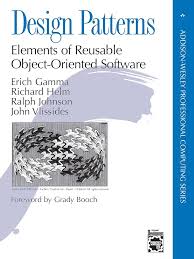
🛠️ Introduced by the Gang of Four (GoF) in 1994 — 23 patterns
Patterns are tools, not rules. Use them when they simplify, not when they impress.
Gamma, Helm, Johnson, Vlissides — the Gang of Four
Three Categories
🏭
Creational
How objects are created
Singleton
Factory Method
Abstract Factory
Builder
Prototype
🧩
Structural
How objects are composed
Adapter
Decorator
Proxy
Composite
Facade
💬
Behavioral
How objects communicate
Observer
Strategy
Iterator
State
Template Method
Strategy Pattern
Define a family of algorithms, put each in a separate class, and make them interchangeable.
Strategy — Real-world Analogy
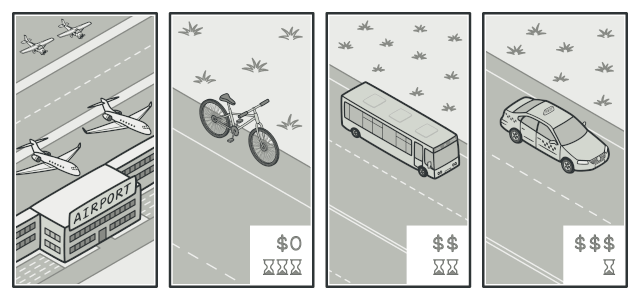
Imagine you have to get to the airport. Different strategies:
🚌 Bus — cheapest, but slowest
🚕 Taxi — fast and comfortable, but expensive
🚲 Bicycle — free and healthy, but weather-dependent
Same goal (reach the airport), different strategies. You pick one depending on budget, time, or weather.
Strategy — The Solution
🗃️ Extract each algorithm into its own class (a "strategy")
🔄 All strategies implement the same interface
🔗 The context object holds a reference to a strategy and delegates work to it
🔁 Swap strategies at runtime without changing the context
Strategy — Structure
Strategy in Python
from abc import ABC, abstractmethod
classRouteStrategy(ABC):
@abstractmethod
defcalculate_route(self, origin, destination):
passclassWalkingStrategy(RouteStrategy):
defcalculate_route(self, origin, destination):
returnf"Walking from {origin} to {destination} via parks"classRoadStrategy(RouteStrategy):
defcalculate_route(self, origin, destination):
returnf"Driving from {origin} to {destination} via highway"classPublicTransportStrategy(RouteStrategy):
defcalculate_route(self, origin, destination):
returnf"Taking bus from {origin} to {destination}"
Hard to remove a specific wrapper from the middle of a stack
Order-dependent — stacking order matters
Complex configuration with many layers
Creational Pattern
Factory
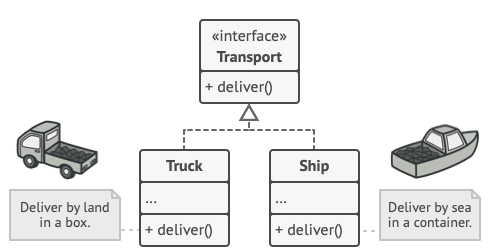
Define an interface for creating objects — let subclasses decide which class to instantiate
Factory: Problem
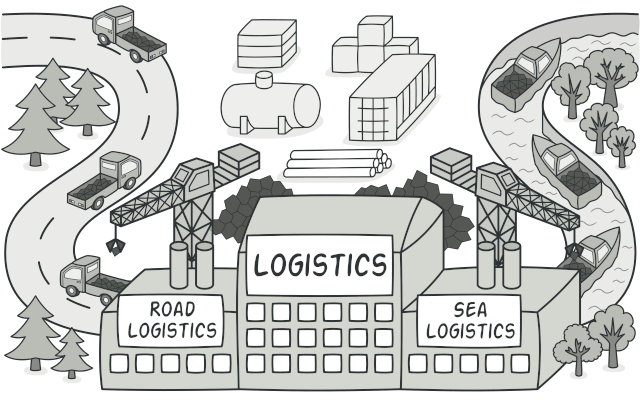
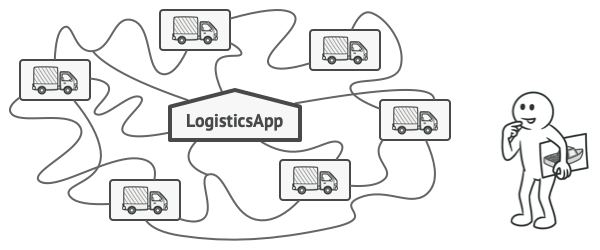
A logistics app that initially handles only truck transport:
classLogistics:
defplan_delivery(self, order):
truck = Truck() # hardcoded!
truck.load(order)
truck.deliver()
# Now we need ships too — and drones, trains...classLogistics:
defplan_delivery(self, order):
if order.destination == "overseas":
ship = Ship()
ship.load(order); ship.deliver()
else:
truck = Truck()
truck.load(order); truck.deliver()
# every new transport = edit this method
Violates the Open-Closed Principle.
Factory: Solution
🔨 Centralize all creation logic in one place
🟢 Clients ask what they need — the factory picks which class
🔁 Adding a new product = one edit to the factory, zero changes to callers
Most useful when many inputs determine which class to instantiate — all that complexity lives in one place.
▶ The diagram on the right shows Factory Method (GoF) — a polymorphic variant with subclass overrides. In Python, the Simple Factory below (a single create() with if/else) is what you'll use 95% of the time.
In practice — many params → one of many classes:
classTransportFactory:
@staticmethoddefcreate(destination, weight, urgent):
if destination == "overseas":
returnShip(weight)
if urgent and weight < 10:
returnDrone(weight)
if weight > 1000:
returnTrain(weight)
returnTruck(weight)
t = TransportFactory.create("overseas", 50, False)
Factory: Code
from abc import ABC, abstractmethod
classTransport(ABC):
@abstractmethod
defdeliver(self):
passclassTruck(Transport):
defdeliver(self):
return"Delivering by land in a box"classShip(Transport):
defdeliver(self):
return"Delivering by sea in a container"
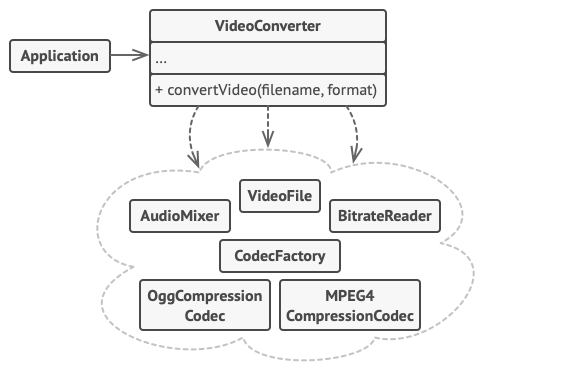
classVideoConverter:
defconvert(self, filename, format):
file = VideoFile(filename)
codec = CodecFactory().extract(file)
result = BitrateReader().read(file, codec)
result = AudioMixer().fix(result)
returnf"{filename} converted to {format}"
converter = VideoConverter()
print(converter.convert("funny_cats.ogg", "mp4"))
# "funny_cats.ogg converted to mp4"
Facade: Pros & Cons
🟢 Pros
Isolate complexity from client code
Promotes loose coupling
Makes subsystem easier to use
Can structure subsystem into layers
🔴 Cons
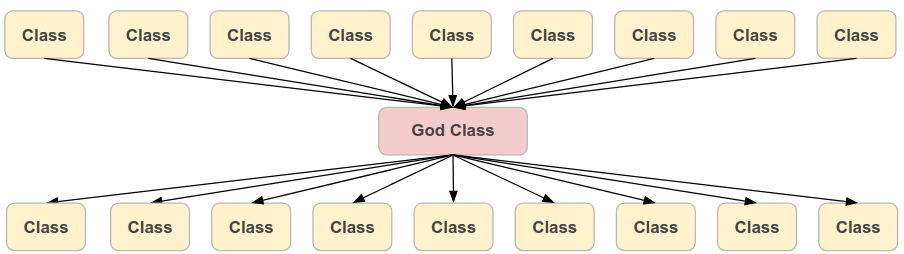
Can become a god object coupled to everything
May hide necessary complexity
Extra layer of indirection
Facade: When to Use
🗃️ You need a limited, simple interface to a complex subsystem
📂 You want to structure a subsystem into layers
📚 You're wrapping a 3rd-party library and want to shield your code from its API changes
👥 You want to provide a convenient default while still allowing advanced access
Behavioral Pattern
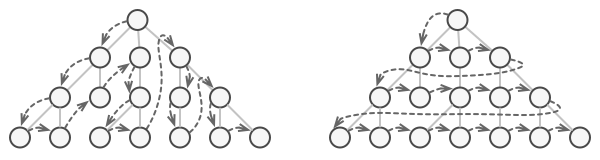
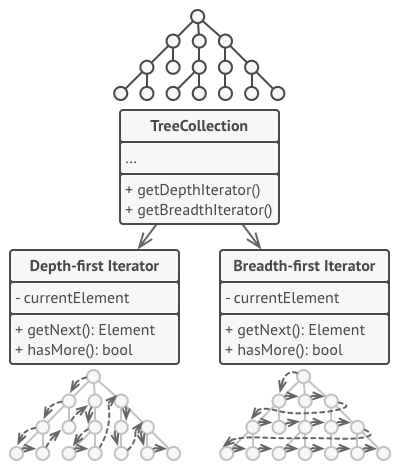
Iterator
Traverse a collection without exposing its internal structure
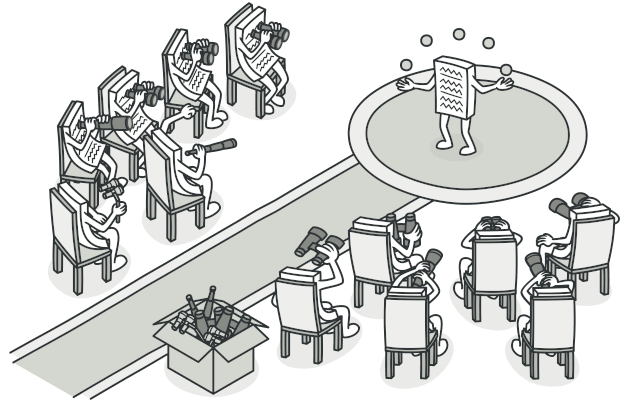
Iterator — Real-world Analogy
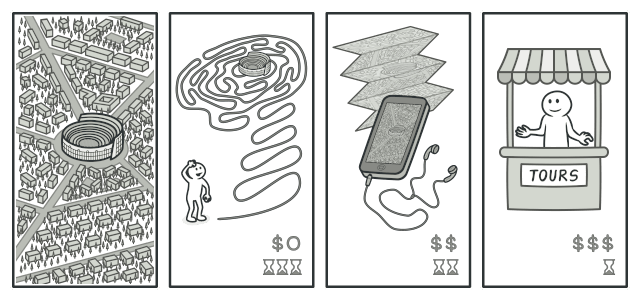
Think of visiting a city as a tourist:
🗺️ The city has many landmarks scattered across districts
📝 You use a guidebook or map that shows you the order to visit them
🚶 You walk from one to the next — without knowing the city's street layout
🌐 Different guides (sightseeing, food tour, art tour) offer different orders over the same city
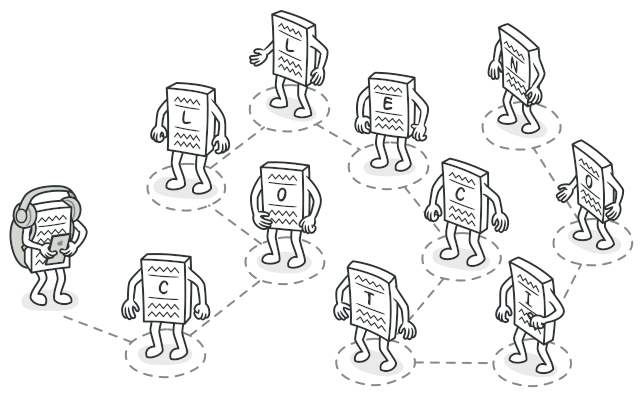
The guide is the iterator. The city is the collection. You traverse the landmarks without caring how they're stored internally.
Iterator: Problem
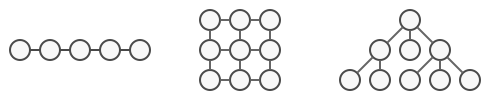
📦 Collections can have different structures: list, tree, stack, graph
🔄 Each structure stores elements differently
💥 Client code shouldn't need to know how elements are stored to iterate over them
😳 Mixing traversal logic with business logic makes code hard to maintain
We need a way to access elements sequentially without exposing the underlying representation.
Iterator: Problem (continued)
Adding new collection types bloats the client with more traversal variants. Every new structure forces every consumer to learn its internals.
Iterator: Solution
🔨 Extract traversal behavior into a separate iterator object
🔭 In Python: implement __iter__ and __next__
🟢 The collection provides an iterator — clients use it without knowing internals
🔁 Multiple iterators can traverse the same collection independently
Python has this built in! Every for loop uses the iterator protocol.
Python Generators — iterators made simple
Writing __iter__ + __next__ is verbose. Python offers a shortcut: generator functions. Use yield instead of return — Python builds the iterator for you.
A full generator in 4 lines:
defcountdown(n):
while n > 0:
yield n
n -= 1for i incountdown(3):
print(i) # 3, 2, 1
How it works — each yield pauses and resumes:
✅ Calling countdown(3) returns a generator object, an iterator for free
🎯 yield n pauses execution and hands n to the caller
🔁 Next iteration resumes right after the yield with local state intact
✅ When the function ends, StopIteration is raised automatically
Also: generator expressions — one-liners:
squares = (x * x for x inrange(10))
print(next(squares)) # 0print(next(squares)) # 1print(sum(squares)) # 4+9+16+...+81 = 280
Generators are lazy — they produce values on demand, not all at once. Perfect for huge or infinite sequences.
Iterator & Python's for Loop
Python's for loop is syntactic sugar for the iterator protocol:
Under the hood
it = iter(collection)
while True:
try:
item = next(it)
exceptStopIteration:
break
What you write
for item in collection:
    process(item)
💡 Any object with __iter__ + __next__ works with for, list(), sum(), etc.
Behavioral Pattern
Observer
Notify many objects when one of them changes
Observer — Real-world Analogy
Think of a YouTube channel:
🎥 The channel (subject) publishes new videos
👤 Subscribers (observers) get notified automatically
❌ The channel doesn't care who subscribes or how many
✅ Subscribers can join or leave freely — no coupling to the channel's internals
One publisher, many subscribers. Loose coupling.
Observer — The Problem
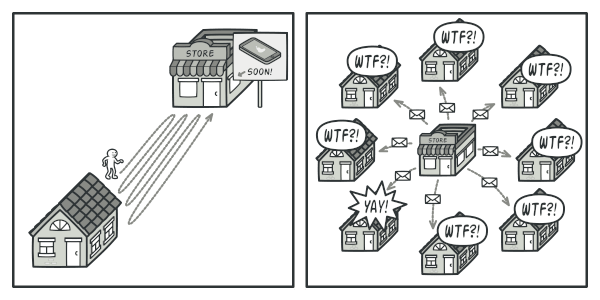
A Customer wants the new iPhone model that's arriving at a Store soon. Two bad options:
🚶 Customer visits daily — most trips are wasted while the product is en route
📧 Store emails everyone on every new product — spam for customers who don't care
Either the customer wastes time polling, or the store wastes resources spamming the wrong people.
Observer in Python
The Subject keeps a list of observers:
classOrder:
def__init__(self):
self._observers = []
self._status = "new"defsubscribe(self, observer):
self._observers.append(observer)
defset_status(self, status):
self._status = status
for obs inself._observers:
obs.update(self)
Observers implement a simple interface:
classEmailNotifier:
defupdate(self, order):
print(f"Email: order is now {order._status}")
classLogger:
defupdate(self, order):
print(f"[LOG] {order._status}")
Usage:
order = Order()
order.subscribe(EmailNotifier())
order.subscribe(Logger())
order.set_status("shipped")
# Email: order is now shipped# [LOG] shipped
Observer — Pros & Cons
✅ Pros
Decoupled — subject and observers don't know each other's types
Open for extension — add new observers without touching the subject
Perfect for event-driven systems, UI updates, pub/sub
❌ Cons
Notification order is unpredictable
Memory leaks if observers forget to unsubscribe
Hard to debug cascading updates across many observers
When to Use Which Pattern?
Pattern
Use when…
Strategy
You have several algorithms doing the same thing and want to pick at runtime
Decorator
You need to add behavior to an object without subclassing
Factory
Object creation logic shouldn't live in the caller
Facade
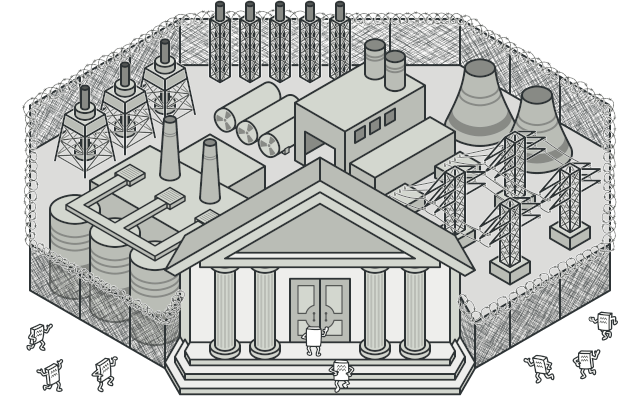
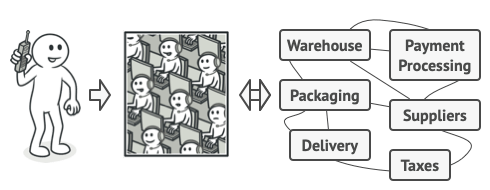
Client code is drowning in subsystem complexity
Iterator
You want to traverse a collection without exposing internals
Observer
Multiple objects must react to a state change
Not sure? Write the simple version first. Refactor to a pattern when the real need appears.
Best Practices
🔎 Understand the problem fully before picking a pattern
❌ Violates SRP. Break into focused classes: AuthService, PaymentService, etc.
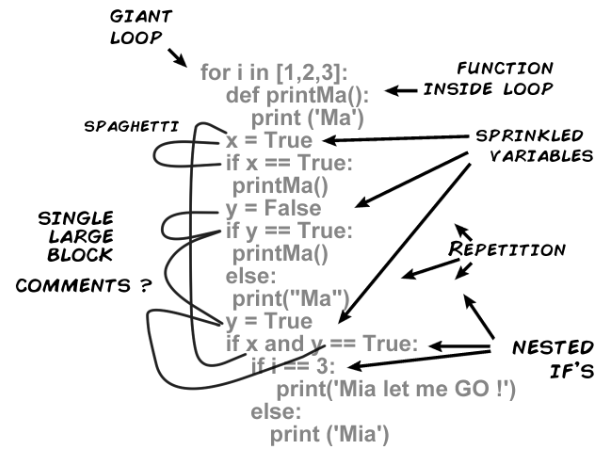
🚫 Anti-pattern: Spaghetti Code
Tangled control flow, deeply nested, hard to follow.
defprocess(data):
if data:
for item in data:
if item.active:
if item.type == "A":
if item.value > 0:
for sub in item.children:
if sub.valid:
...
🚫 Hard to read, debug, and test
✅ Fix with: early returns, extract methods, design patterns
🚫 Anti-pattern: Golden Hammer
"If all you have is a hammer, everything looks like a nail."
You just learned 6 design patterns. Now every problem looks like one of them.
# "I need to add two numbers. Obviously Strategy."classAdditionStrategy:
defexecute(self, a, b): return a + b
classCalculator:
def__init__(self, s): self.s = s
defcalc(self, a, b): returnself.s.execute(a, b)
calc = Calculator(AdditionStrategy())
result = calc.calc(2, 3) # 20 lines to compute 2 + 3
✅ Use patterns when they simplify, not when they impress. A function is often enough.
🚫 Anti-pattern: Copy-Paste Programming
The same logic repeated 5 times, each slightly different. Fix a bug in one place — it still lives in the other four.
✅ DRY (Don't Repeat Yourself) — extract the shared logic into one function that takes the entity type as a parameter.
🤖 AI & Design Patterns
AI knows every GoF pattern by heart — do you still need to learn them?
🤖 Why Patterns Matter More with AI
💬 Patterns are a shared vocabulary — between humans AND between humans and AI
🔍 When AI generates code, recognizing the pattern is how you review and trust it
🎯 You can ask AI: "Refactor this to use the Strategy pattern" — and understand the result
⚠️ Without pattern knowledge, AI output is a black box — you accept or reject on vibes
Patterns don't become obsolete — they become the interface between you and AI-generated code.
🤖 AI & Patterns: Pros & Cons
✅ Pros
💡 Can suggest the right pattern for a described problem
⚡ Generates pattern boilerplate in seconds (Strategy, Factory skeletons)
📚 Explains why an existing codebase uses a specific pattern
🔄 Refactors tangled code toward a clean pattern on request
❌ Cons
🔨 Golden Hammer — AI loves patterns, will use them where a 3-line function works
🤦 Can invent "standard" patterns that don't actually exist
🗸️ Doesn't weigh trade-offs in your specific codebase context
🔒 Critical design calls (which pattern, if any) still need human judgment
The rule: AI suggests patterns — you decide if they fit. Knowing the patterns is how you can tell.
🧠 Pattern Check
Can you spot the pattern from the code?
Quiz Time! (End of Lecture)
Which pattern does this code implement?
classLoggedReader:
def__init__(self, reader):
self._reader = reader
defread(self):
data = self._reader.read()
log(f"Read {len(data)} bytes")
return data
reader = LoggedReader(FileReader("data.txt"))
reader.read()
A) Facade
B) Decorator
C) Strategy
D) Observer
Decorator: LoggedReader wraps another reader and adds logging behavior without modifying the original class. Same interface (read()), extra behavior layered on top.
Strategy: the tax rule is injected at construction time and called by calc(). Swap the algorithm (USA vs EU) without changing the TaxCalculator class.
Key Takeaways
Strategy — swappable algorithms behind a common interface. Pick the right one at runtime
Decorator — layered behaviors by wrapping objects. Extend without subclassing
Factory — centralize creation logic in one place. Clients ask for a product by description; the factory picks the right class
Facade — simplified interface to a complex subsystem. Hide the complexity
Iterator — sequential access without exposing internals. Python's for loop uses it
Observer — one-to-many notifications. Decouples publishers from subscribers
Patterns are tools, not rules. Use them when they simplify, not when they impress.
Next Up
Libraries & Frameworks
Pandas, NumPy, FastAPI, Flask — and how to build your own.
📢 Coursework Deadline
Sunday April 26, 23:59 Vilnius time
Time remaining
——h ——m ——s
Submit before this moment. After this moment, it's late.
📋 Coursework FAQ
What about April 27 at 09:00?
❌ Now you're just being optimistic.
What about April 27 at 00:30?
❌ Still after.Time is linear.
Is April 27 at 00:00:01 after the deadline?
❌ Yes.It is. Sorry.
📋 Coursework FAQ — Cutting it close
Is April 26 at 23:59:59 OK?
⚠️ Technically.Pure adrenaline. Don't.
Is April 26 at 23:58 OK?
✅ Yes.Responsible adult behavior.
What if I'm in a different time zone?
🌏 23:59 Vilnius time. Set your watch.
📋 Coursework FAQ — Excuses
My laptop crashed at 23:58.
Should've submitted at 23:00. 🤷
Can I email the file instead?
❌ No.Use GitHub and Moodle.
My cat walked on the keyboard and deleted my project.
🐈 Use git. git push = cat-proof.
📋 Coursework FAQ — The bigger picture
Can I get an extension?
❌ No.Unless you have a really good reason.
Real one from 2 years ago: "My neighbor's room caught on fire, I had to evacuate. By the time I got back it was 4 am. Can I have a second chance to defend my course work?" ✅ That worked.
When should I actually start?
Right now.Check the countdown — it only goes one way.