Please use a larger screen
This presentation is designed for desktop or projector displays.
← Back to curriculum
|
Python Object Oriented Programming
UML & Design Patterns
Course 8
Animal
+name: str
-age: int
+speak()
+move()
← → to navigate
Course Curriculum
Where we are in the journey
0. Introduction to the course
1. Classes vs. Objects
2. Encapsulation & Access Control
3. Inheritance
4. Polymorphism & PEP 8
5. Composition & Aggregation
6. Exception Handling & Logging
7. SOLID Principles
8. UML & Design Patterns
9. Design Patterns (2nd part)
10. Testing & TDD
11. Libraries & Frameworks
12. Recap & Consultation
Quiz Time! (Lecture 05)
In aggregation, what happens to parts when the container is destroyed?
A) They are destroyed too
B) They continue to exist independently
D) They move to a new container
Aggregation is a weak "has-a" relationship — parts are passed in from outside and survive independently when the container is destroyed.
Recap: Lecture 05
Composition vs Aggregation
Composition : strong ownership — parts created inside, destroyed with the ownerAggregation : weak reference — parts passed in, survive independentlyPrefer composition over inheritance when there's no "is-a" relationship
class Team :
def __init__ (self , members):
self .members = members
player = Player ("Alice" )
team = Team ([player])
del team
print (player.name) # "Alice" still exists
Quiz Time! (Lecture 06)
What does the raise keyword do?
A) Throws / raises an exception
D) Logs an exception to a file
raise explicitly throws an exception , allowing you to signal errors in your own code. You can raise built-in or custom exceptions.
Recap: Lecture 06
Exception Handling: raise
raise — throw your own exceptionsCan raise built-in exceptions: ValueError, TypeError
Or create custom exceptions by extending Exception
Use to enforce preconditions and signal invalid state
def set_age (age):
if age < 0 :
raise ValueError ("Age cannot be negative" )
return age
class InsufficientFunds (Exception ):
pass
Quiz Time! (Lecture 07)
Which SOLID principle does this code violate?
class NotificationService :
def send (self , message, channel):
if channel == "email" :
self ._send_email (message)
elif channel == "sms" :
self ._send_sms (message)
elif channel == "slack" :
self ._send_slack (message)Adding WhatsApp means editing this class . OCP says extend with new classes (e.g., WhatsAppChannel), don't modify existing ones.
Recap: Lecture 07
SOLID: Open-Closed Principle
Open for extension — you can add new behaviorClosed for modification — don't change existing working codeUse polymorphism and abstractions to extend
Prevents regressions when adding features
class Shape (ABC):
@abstractmethod
def area (self ): ...
class Circle (Shape ):
def area (self ):
return 3.14 * self .r ** 2
class Triangle (Shape ):
def area (self ):
return 0.5 * self .b * self .h
Agenda for Today
📐 UML — the visual language for software design
📚 What are Design Patterns ?
💡 Why are they important ?
🗃️ How are they categorized ?
🔍 Deep dive into 2 patterns:
🔸 Singleton — one instance, global access
🔷 Builder — step-by-step construction
UML — Unified Modeling Language
A standardized visual language for software design
What is UML ?
📐 Unified Modeling Language — a standardized visual language for software design
🎨 Not a programming language — a modeling language
🤝 Provides a common vocabulary for developers, architects, and stakeholders
📄 Used to visualize, specify, construct, and document software systems
UML helps you think about design before you write code.
UML Diagram Categories
📂 Structural Diagrams
Static view — what the system is
Class Diagram
Object Diagram
Component Diagram
Package Diagram
⚡ Behavioral Diagrams
Dynamic view — what the system does
Sequence Diagram
Use Case Diagram
Activity Diagram
State Machine Diagram
Class Diagrams
The most commonly used UML diagram — let's build one step by step
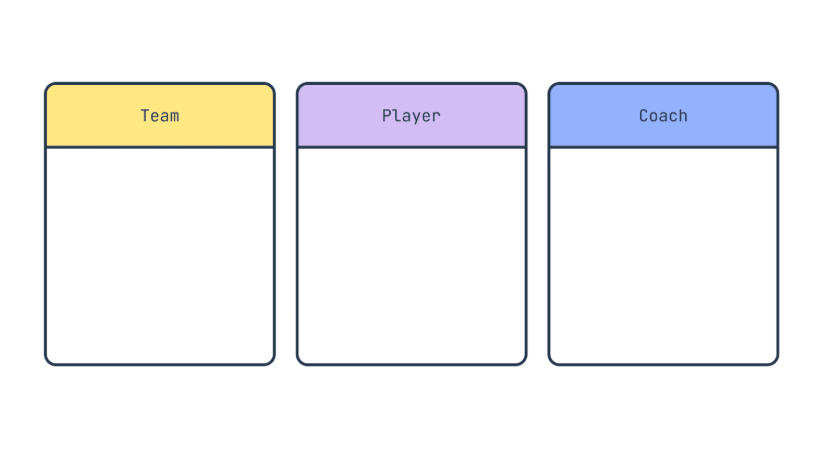
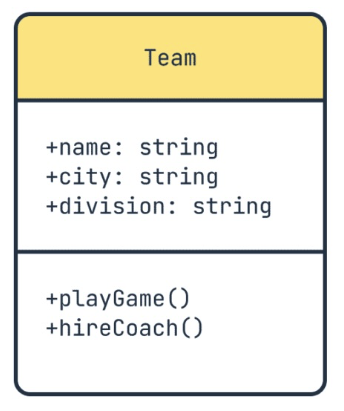
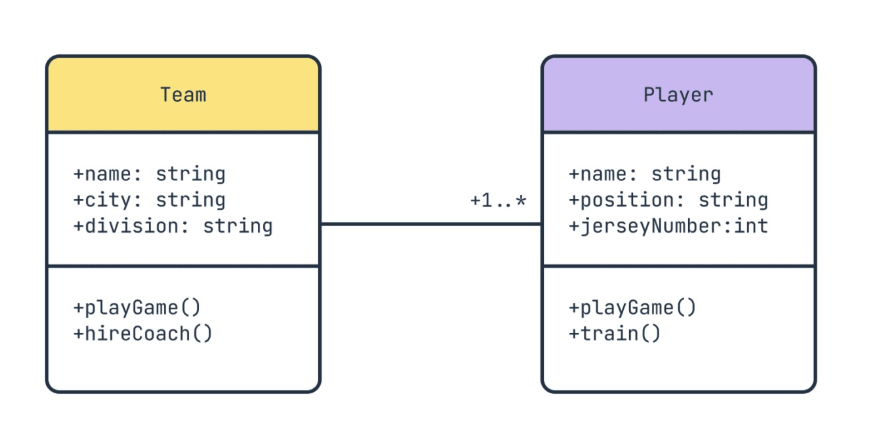
Step 1: Identify Classes
Start by identifying the key entities in your domain
Each box represents a class — a blueprint for objects in our system.
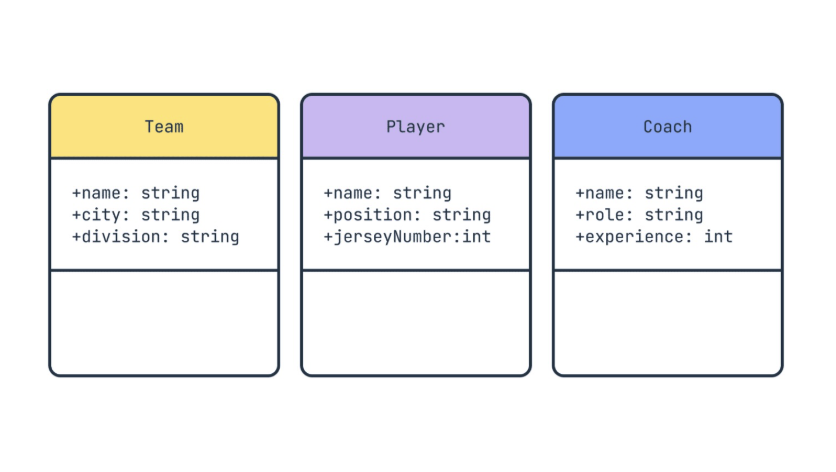
Step 2: Add Attributes
Define the data each class holds
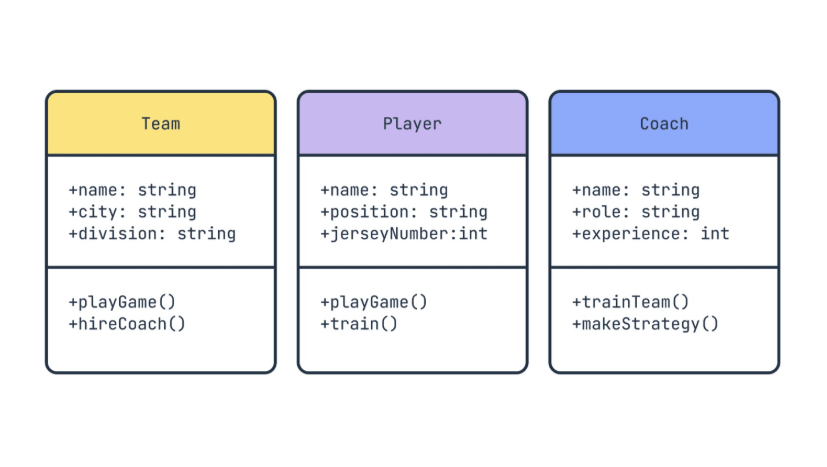
Step 3: Add Methods
Define what each class can do
Step 4: Visibility Symbols
Control access to attributes and methods
+
Public
Accessible from anywhere
-
Private
Only within the class
#
Protected
Class + subclasses
~
Package
Within the package
In Python: _name = protected, __name = private
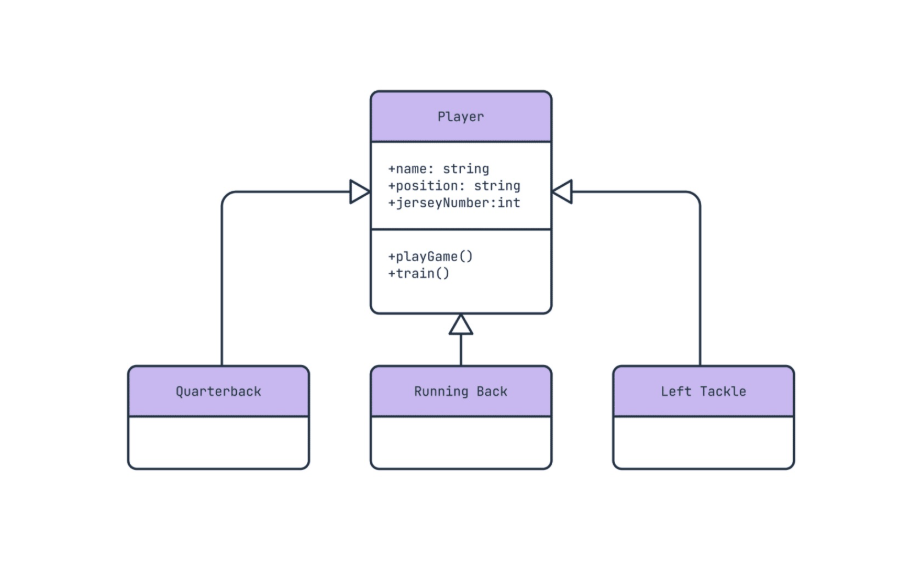
Step 5: Inheritance (Generalization)
An arrow with a hollow triangle points to the parent class
Hollow triangle △ = inheritance ("is-a" relationship)
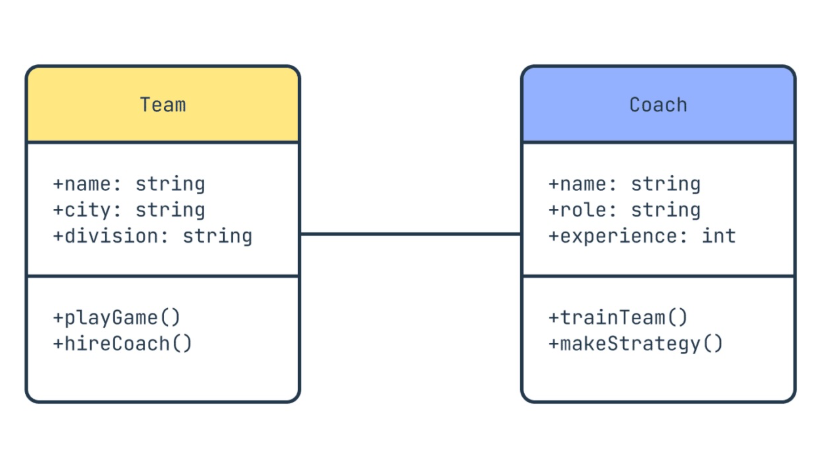
Step 6: Association
A relationship where one class is related to another but not necessarily dependent
Simple line = association (Team employs Coach)
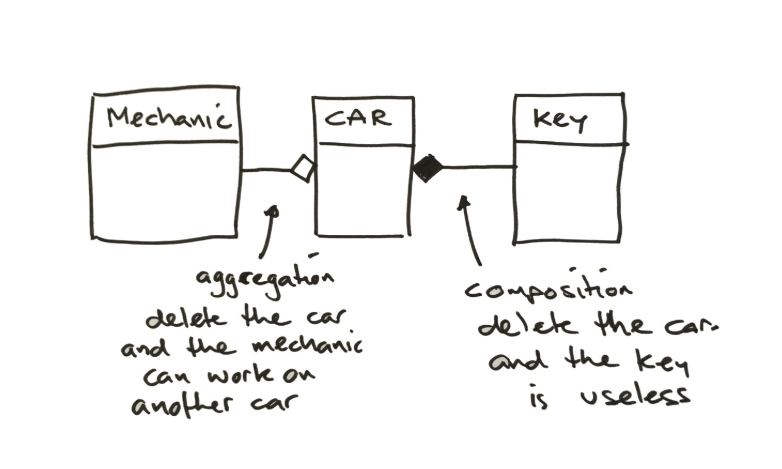
Step 7: Composition & Aggregation
Ownership relationships between classes
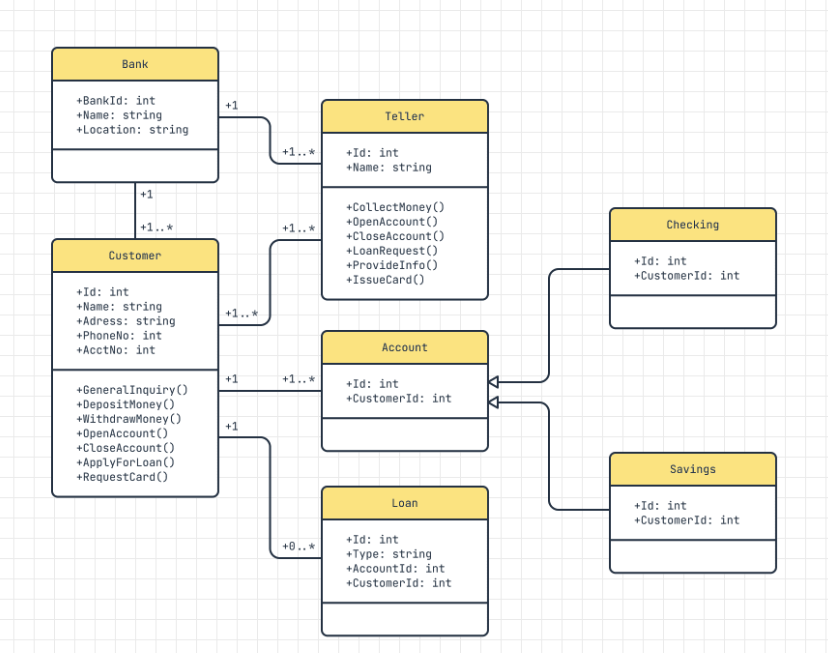
◇ Aggregation (empty diamond) = parts survive independently. ◆ Composition (filled diamond) = parts die with the owner.
Step 8: Multiplicity
How many instances of one class relate to another
Common notations:
1 — exactly one0..1 — zero or one1..* — one or more* — zero or moren..m — specific range
Class Diagram Cheat Sheet
Visibility
+ public
- private
# protected
~ package
Relationships
──▷ Generalization
─── Association
◇── Aggregation
◆── Composition
Other
- - -▷ Dependency
«interface» stereotype
italic = abstract
1..* multiplicity
Full Example: Bank System
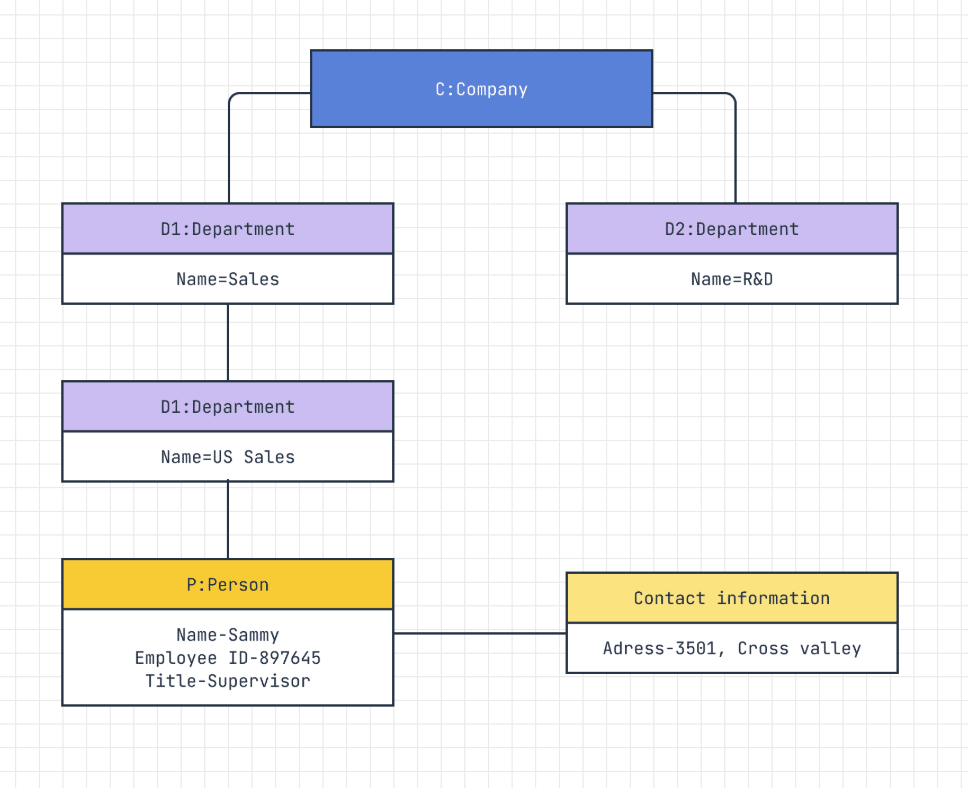
Object Diagram: Instance Snapshot
📷 A snapshot of objects at a specific point in time
📚 Shows actual values , not types
🔗 Object names are underlined
🔎 Useful for debugging and understanding state
myBook: Book
title = "Clean Code"
author = "R. Martin"
lib: Library
name = "City Library"
books = [myBook]
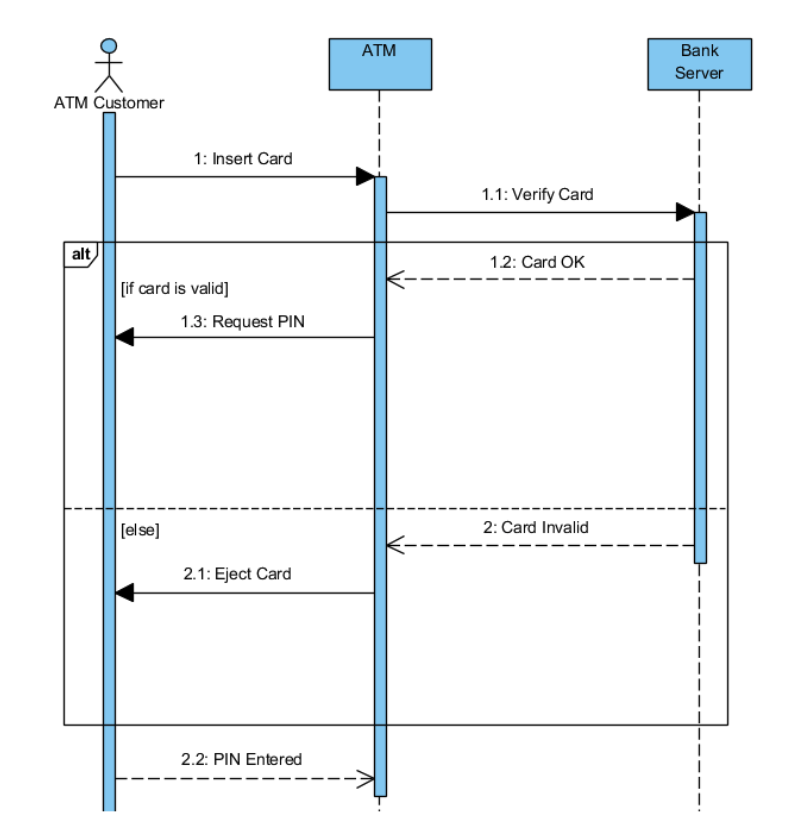
Sequence Diagram: ATM Example
Why Sequence Diagrams ?
🔄 Model flow of messages between objects over time
📝 Specify behavior of a system interaction
🎨 Visualize scenarios — happy path, error cases, edge cases
🔧 Design & debugging — understand how components interact
👥 Communication tool — explain flows to non-technical stakeholders
Solid arrows = calls/requests . Dashed arrows = responses/returns . Time flows top to bottom .
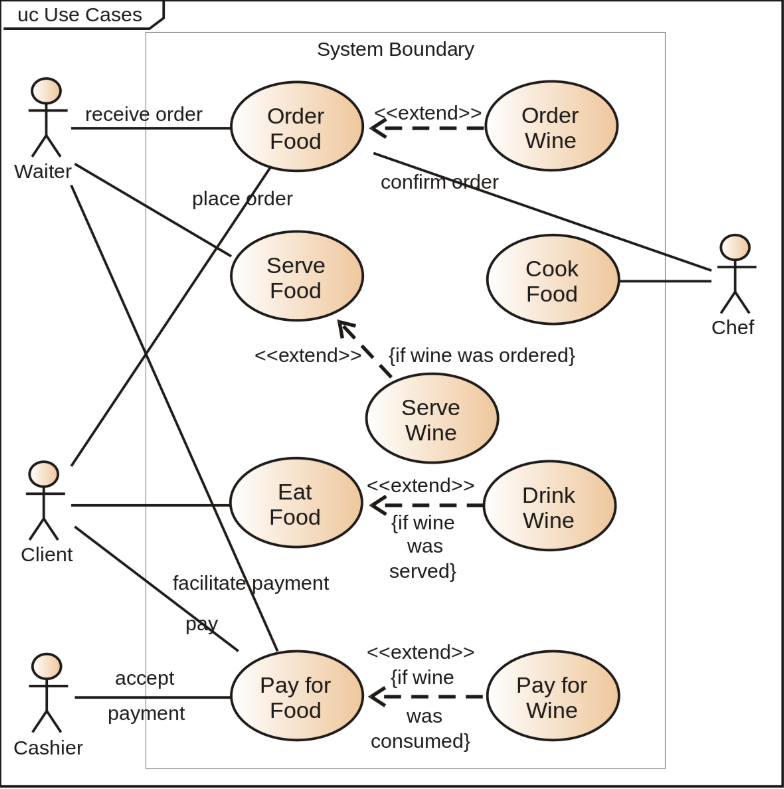
Use Case Diagrams
Functional requirements from the user's perspective
Use Case: Restaurant System
Why Use Case Diagrams ?
📋 Requirements analysis — capture what the system should do
🛠️ System design — identify system boundaries and actors
👥 User interactions — map who interacts with what
📄 Documentation — common language between developers and stakeholders
🎯 Scope definition — clearly define what's in/out of the system
Stick figures = actors (users or external systems). Ovals = use cases (what the system does). Box = system boundary .
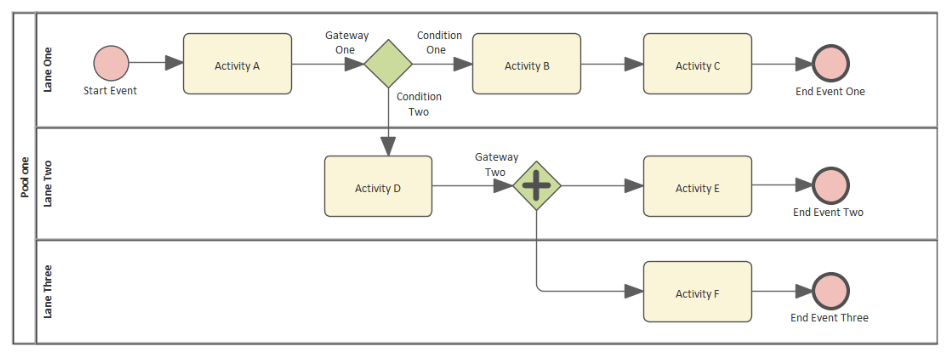
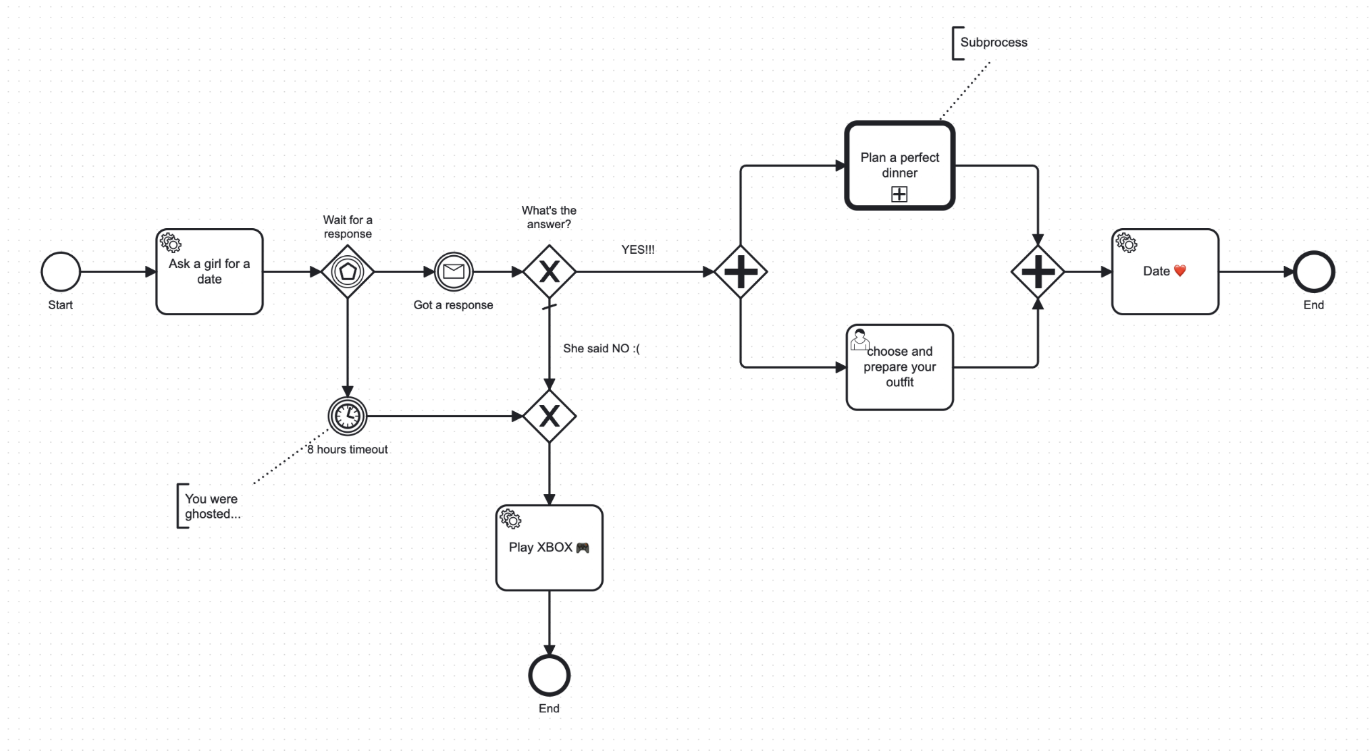
BPMN: Business Process Modeling
📈 BPMN = Business Process Model and Notation
🔄 Standard for flowcharting business processes
🟢 Start event (circle), 🔴 End event (bold circle)
▣ Tasks (rounded rectangles)
◆ Gateways (diamonds) — decision points
➔ Sequence flows (arrows)
BPMN Fun: Ask for a Date 😊
🛠️ Design Patterns
Proven solutions to common software design problems
What is a Design Pattern ?
A standardized solution to a commonly occurring problem in software design.
They are templates , not ready-made code. You adapt the pattern to fit your specific problem.
💡 Think of patterns as blueprints — they show the approach, but the implementation is yours.
🚲 Don't reinvent the wheel!
⚡ Efficiency: Solve problems faster with proven approaches
🛡️ Reliability: Battle-tested solutions used by thousands of developers
🗣️ Standardization: Common vocabulary your team already understands
🚫 Avoid pitfalls: Learn from decades of mistakes made by others
You wouldn't design your own sorting algorithm for production code — the same logic applies to software architecture.
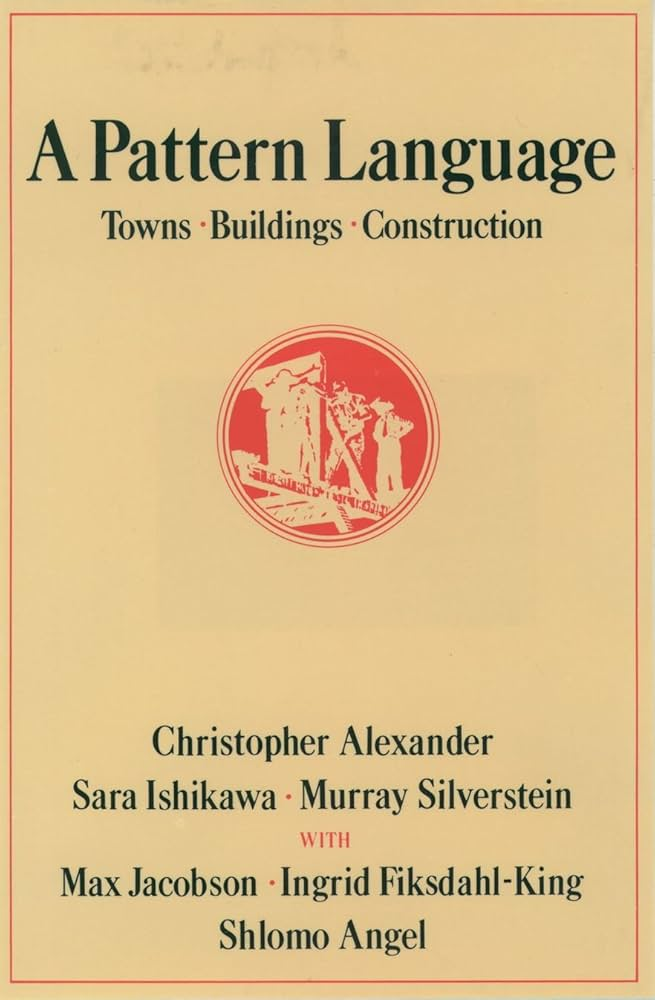
History: Christopher Alexander
🏧 Architect (buildings, not software)
📅 1970s — published "A Pattern Language"
💡 Identified 253 architectural patterns for building towns and cities
🔬 Key insight: recurring problems have recurring solutions
Software engineers borrowed this idea: if buildings have patterns, so does code .
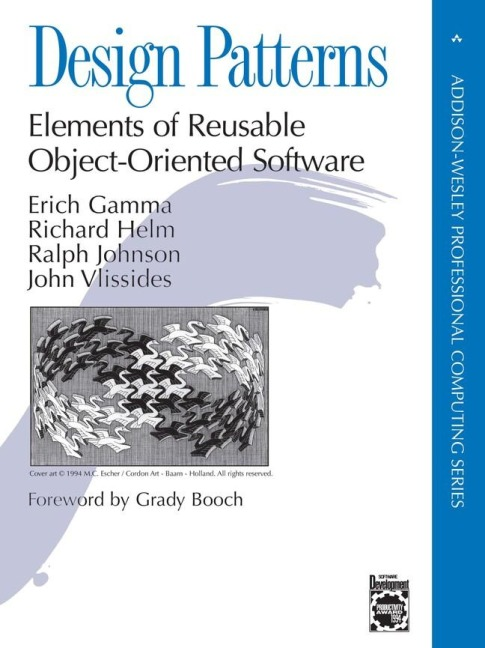
The Gang of Four (GoF)
📖 "Design Patterns: Elements of Reusable Object-Oriented Software" (1994)
👥 Four authors: Gamma, Helm, Johnson, Vlissides
📜 Catalogued 23 design patterns
🏆 Became the bible of OOP design
When someone says "design patterns," they usually mean the GoF patterns.
Problem-solving toolkit
🗣️ Shared language: "Let's use a Strategy pattern here" — everyone instantly understands
🔎 Identify solutions quickly: Recognize the problem, apply the matching pattern
👥 Onboarding: New team members can understand architecture faster when patterns are documented
Patterns give developers a common vocabulary that transcends programming languages.
Code quality
🔎 Readability: Well-known patterns make code easier to understand at a glance
🛠️ Maintainability: Changes are localized to specific classes, not scattered everywhere
✅ Testability: Patterns encourage small, focused classes that are easy to unit test
Patterns promote the SOLID principles we learned last week.
Adaptability & scalability
🔗 Loose coupling: Objects depend on abstractions, not concrete implementations
🧩 High cohesion: Related behavior grouped together, unrelated behavior separated
🚀 Scalability: Add new features without rewriting existing code
🔄 Flexibility: Swap components at runtime without modifying the system
Three Categories
🏭
Creational
How objects are created
Singleton
Factory Method
Abstract Factory
Builder
Prototype
🧩
Structural
How objects are composed
Adapter
Decorator
Proxy
Composite
Facade
💬
Behavioral
How objects communicate
Observer
Strategy
Command
Iterator
State
Creational PatternsDeal with object creation mechanisms
Factory Method Delegate instantiation to subclasses
Abstract Factory Families of related objects
Builder Complex objects step by step
Prototype Clone existing objects
Singleton One instance, global access
Structural PatternsHow classes and objects are composed into larger structures
Adapter Incompatible interfaces work together
Bridge Separate abstraction from implementation
Composite Tree structures of objects
Decorator Add responsibilities dynamically
Facade Simple interface to complex subsystem
Proxy Surrogate or placeholder
Behavioral PatternsHow objects communicate and distribute responsibility
Observer Notify dependents of changes
Strategy Interchangeable algorithms
Command Encapsulate request as object
Iterator Access elements sequentially
State Alter behavior when state changes
Visitor New operations without modifying
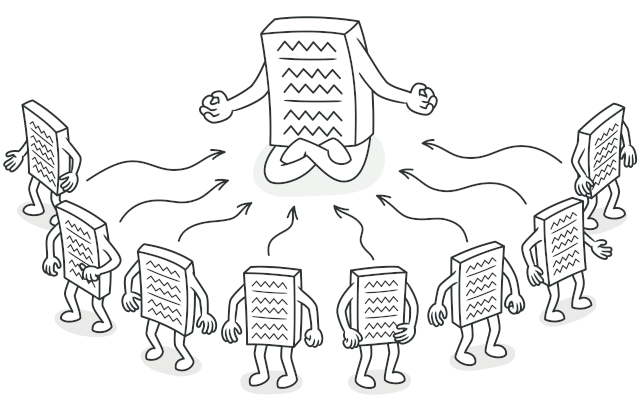
Singleton PatternEnsure a class has only one instance global access point to it.
Singleton — The Problem
Two problems that Singleton solves:
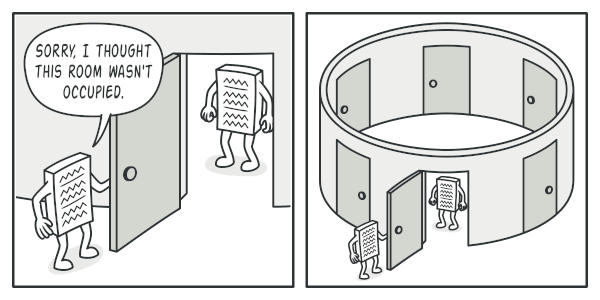
⚠️ Ensure a single instance: Some resources should only exist once — database, config, logger
🌐 Global access point: Any part of the code needs to reach that single instance
💡 A regular constructor always returns a new object. Singleton overrides this.
Singleton in Real Life
🏳️
One President
A country has exactly one president . Everyone refers to the same person. You don't create a new one each time.
📋
One Clipboard
Your phone has one clipboard . Copy from any app, paste in any app — it's always the same clipboard.
🏫
One Principal
A school has one principal . One office, one person in charge. Everyone goes to the same one.
💡 In code: one database connection, one configuration manager, one logger — same idea.
Singleton — The Solution
🔒 Make the default constructor private (or override __new__ in Python)
📜 Create a static creation method that acts as a constructor
🔁 On first call — create the object and store it in a class variable
🔄 On subsequent calls — return the existing instance
In Python, we override __new__ since there are no truly private constructors.
The __new__ Special Method
Python's object creation involves two steps :
🔸 __new__(cls) — creates the instance
🔸 __init__(self) — initializes the instance
Singleton needs to control creation itself.
__new__ runs before __init__
1.
__new__ creates instance
Allocates memory, returns object
2.
__init__ initializes instance
Sets attributes, runs setup
3.
Object returned to caller
4.
__del__ destroys (GC)
Singleton — UML Diagram
Singleton
- _instance: Singleton
- __new__(cls)
+ query(sql)
+ connection
Client
returns same
instance
- private constructor prevents external instantiation__new__ checks if _instance exists, returns it or creates one
Singleton in Python
class DatabaseSingleton :
_instance = None
def __new__ (cls):
if cls._instance is None :
cls._instance = super ().__new__ (cls)
cls._instance.connection = "Connected to DB"
return cls._instance
def query (self , sql):
return f"Executing: {sql}"
✅ How it works:
_instance stores the single object (starts as None)__new__ checks: if no instance exists → create one; otherwise → return existingEvery call to DatabaseSingleton() returns the same object
Singleton — Usageclass ProductRepository :
def __init__ (self ):
self .db = DatabaseSingleton ()
def get_products (self ):
return self .db.query ("SELECT * FROM products" )
class UserRepository :
def __init__ (self ):
self .db = DatabaseSingleton ()
def get_users (self ):
return self .db.query ("SELECT * FROM users" )
product_repo = ProductRepository ()
user_repo = UserRepository ()
print (product_repo.db is user_repo.db) # True — same instance!
Singleton — When to Use
Use when you need to control access to a shared resource :
🗃️ Database connection — avoid opening multiple connections
📄 File manager — single point of access to the filesystem
⚙️ Configuration — app-wide settings loaded once
📜 Logger — centralized logging instance
Singleton — Pros & Cons
✅ Pros
Single instance guaranteedGlobal access pointLazy initialization — created only when first needed
❌ Cons
Violates SRP — manages its own lifecycle + does its jobMasks bad design — global state is a code smellThreading issues — race conditions without locksHard to test — shared state leaks between tests
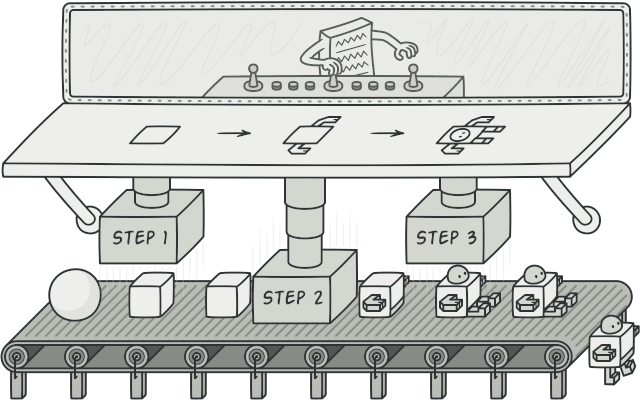
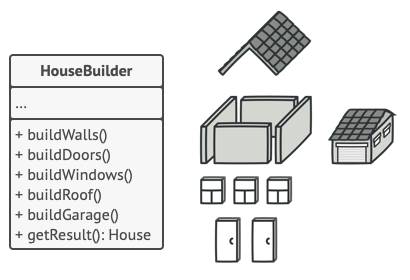
Builder PatternConstruct complex objects step by step.
Builder — The Problem
Imagine an object that requires a monstrous constructor :
class Car :
def __init__ (self , engine, tires, color, sunroof,
gps, seats, stereo, air_conditioning,
turbo, parking_sensors, ...):
...
😱 Most parameters are optional
😖 Hard to remember the order of arguments
🚫 Constructor calls become unreadable
Builder in Real Life
🍔
Ordering a Burger
Pick bun, patty, cheese, sauce, extras step by step . Same process → Big Mac or custom burger.
🍕
Building a Pizza
Choose base, sauce, toppings, size. Not all options required — a margherita skips most toppings.
🛒
IKEA Furniture
Follow steps, skip optional parts (shelf dividers, extra drawers). Same instructions, different results.
💡 In code: build a complex object (Car, Computer, Query) one piece at a time, only setting what you need.
Builder — The Solution
🗃️ Extract construction into a separate Builder class
🔄 Step-by-step methods to configure each part
🔗 Methods return self for method chaining
✅ build() returns the final object
💡 Only call the steps you need for your configuration.
Builder in Python
The product:
class Car :
def __init__ (self ):
self .engine = None
self .tires = None
self .color = None
def __str__ (self ):
return (f"Car: {self.engine}, "
f"{self.tires}, {self.color}" )
The builder:
class CarBuilder :
def __init__ (self ):
self .car = Car ()
def set_engine (self , engine):
self .car.engine = engine
return self
def set_tires (self , tires):
self .car.tires = tires
return self
def set_color (self , color):
self .car.color = color
return self
def build (self ):
return self .car
✅ Key points:
Each set_ method returns self → enables method chaining
build() returns the finished product
Builder — Bigger Example
class Computer :
def __init__ (self ):
self .cpu = None
self .ram = None
self .storage = None
self .gpu = None
self .os = None
class ComputerBuilder :
def __init__ (self ):
self .computer = Computer ()
def set_cpu (self , cpu):
self .computer.cpu = cpu
return self
def set_ram (self , ram):
self .computer.ram = ram
return self
def set_storage (self , storage):
self .computer.storage = storage
return self
def set_gpu (self , gpu):
self .computer.gpu = gpu
return self
def set_os (self , os):
self .computer.os = os
return self
def build (self ):
return self .computer
Builder — Usagebuilder = ComputerBuilder ()
gaming_pc = (builder
.set_cpu ("Intel i9" )
.set_ram ("64GB" )
.set_storage ("2TB SSD" )
.set_gpu ("RTX 4090" )
.set_os ("Windows 11" )
.build ())
builder = ComputerBuilder ()
office_pc = (builder
.set_cpu ("Intel i5" )
.set_ram ("16GB" )
.set_storage ("512GB SSD" )
.set_os ("Ubuntu" )
.build ())
Same builder class, different configurations. office_pc skips the GPU — not every step is required.
Builder — Pros & Cons
✅ Pros
Step-by-step constructionReuse construction code for different configurationsSRP — isolates complex construction from business logicReadable — method chaining is self-documenting
❌ Cons
Code complexity increases — more classes to maintainOverkill for simple objects with few fields
Key Takeaways
📐 UML — visual language for designing and documenting software systems
📂 Class diagrams show structure: classes, attributes, methods, relationships
🔄 Sequence diagrams show behavior: interactions over time
Singleton — guarantees one instance with global access. Use for shared resources (database, config)Builder — step-by-step construction of complex objects. Eliminates monstrous constructors
Patterns are tools , not rules. Use them when they simplify, not when they impress.
Next Up
Design Patterns (Part 2)
Strategy
Decorator
Factory
Strategy, Decorator, Factory Method, and more!
Skip Quiz ▶
☼
‹
›